


Whether you're planning a city break to Barcelona, a sun-soaked holiday in the Canary Islands, or a cultural tour of Madrid, finding affordable flights to Spain is key to making your trip budget-friendly.
Skyscanner is one of the most powerful tools for finding cheap flights to and from Spain.
In this in-depth guide, we’ll explore how to use Skyscanner effectively, with tips, tricks, and step-by-step instructions to help you save money on your next trip.

What is Skyscanner?
Skyscanner is a leading travel search engine that compares flights, hotels, and car hire deals from hundreds of providers.
It aggregates data from airlines, online travel agencies, and other booking platforms to help users find the best prices.
Skyscanner is free and available as a website and mobile app, making it a convenient tool for travellers.
What is Sky Scanner Useful For?
Flexible Date Searches. Skyscanner simplifies finding better and more affordable flight options to and from your destination. Their "cheapest month" feature lets users view fares for the most cost-effective month based on their chosen departure and destination. This is especially helpful if you have a specific location in mind but are flexible with your travel dates.
Budget-Friendly Destination Searches. If you're open to travelling anywhere and want to stay within a specific budget, Skyscanner’s "Everywhere" search tool is handy. This feature is perfect for travellers who are flexible about their destination and want to explore affordable options.
Flexible Departure and Destination Searches. Unlike many other search engines, Skyscanner lets you search for flights across an entire country rather than limiting you to a specific city or airport. This broadens your options and makes finding flights that suit your needs more leisurely.
Access to Smaller OTAs. Skyscanner frequently finds the lowest flight prices by including smaller online travel agencies (OTAs) that many other search engines overlook. This gives you access to a broader range of options and better deals.
Last-Minute Flight Searches. Skyscanner excels at finding budget-friendly last-minute flights, making it an excellent choice for spontaneous travellers. Unlike other search engines, it often uncovers deals that others miss.
Price Alerts for Specific Routes. You can set price alerts if you have fixed travel dates and a set destination. Skyscanner will notify you via email about price changes for your chosen route, helping you book at the best time.
User-Friendly App. The Skyscanner app stands out among its competitors with its clean, intuitive interface and seamless functionality. You can easily track price changes and receive alerts directly on your phone, making it a convenient tool for planning your travels.
Why Use Skyscanner to Find Cheap Flights?
Comprehensive Search: Skyscanner searches thousands of airlines and travel agencies for the best deals.
Flexible Options: You can search for flights by specific dates, whole months, or even the cheapest months to travel.
Price Alerts: Skyscanner allows you to set up price alerts to monitor fare changes.
User-Friendly Interface: The platform is easy to navigate, even for first-time users.
No Hidden Fees: Skyscanner displays the total price of flights, including taxes and fees.
Step-by-Step Guide to Finding Cheap Flights to Spain
Start with a Flexible Search
Flexibility is one of the most effective ways to find cheap flights. Skyscanner’s "Whole Month" and "Cheapest Month" features allow you to compare prices across dates.
How to Use the Whole Month Search:

Go to Skyscanner’s website or open the app.
Enter your departure city and select "Spain" as your destination.
Instead of selecting specific dates, click on the "Depart" field and choose "Whole Month" or "Cheapest Month."
Skyscanner will display a calendar view with the cheapest days to fly. Green indicates the lowest prices.
Skyscanner Whole Month Search
Example of Skyscanner’s Whole Month search feature.
By flying on a Tuesday or Wednesday, you can often save significantly compared to weekend flights.
- Use the "Everywhere" Feature for Inspiration
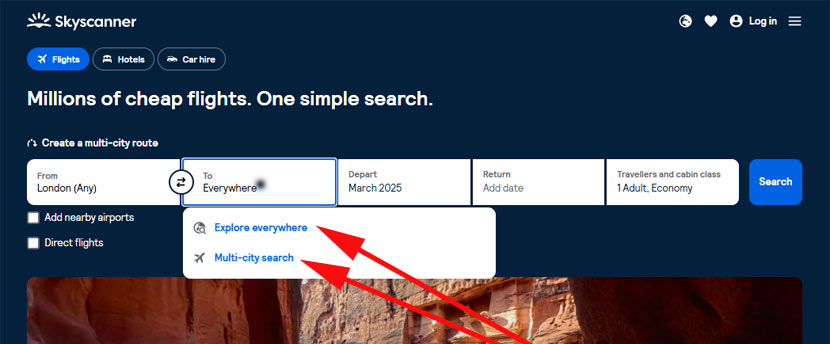
If you’re open to exploring different parts of Spain or flying from various airports, use Skyscanner’s "Everywhere" feature to find the cheapest options.
How to Use the Everywhere Feature:
Enter your departure city.
In the destination field, type "Everywhere."
Select your travel dates or use the "Cheapest Month" option.
Skyscanner will show you a list of destinations sorted by price.
This is particularly useful if you’re flexible about which city in Spain to visit. For example, flying into Malaga might be cheaper than Barcelona.
Set Up Price Alerts

If your travel dates are fixed, set up a price alert to monitor fare changes. Skyscanner will notify you when prices drop, allowing you to book at the best time.
How to Set Up a Price Alert:
Perform a flight search with your desired dates and destination.
On the results page, toggle the "Get Price Alerts" button.
Skyscanner will notify you via email or the app when prices drop.
Skyscanner Price Alert
Example of setting up a price alert on Skyscanner.
Consider Multi-City Flights

If you plan to visit multiple cities in Spain or combine your trip with other destinations, a multi-city flight might be cheaper than booking separate one-way tickets.
How to Book Multi-City Flights:
On Skyscanner’s homepage, select the "Multi-city" option.
Enter your departure city, first destination, and subsequent destinations.
Add your travel dates and search for flights.
For example, you could fly into Madrid, travel to Barcelona, and then return home from Malaga.
Use the One-Way Flight Option

Sometimes, booking two separate one-way flights can be cheaper than a return ticket. This is especially true if you fly with different airlines or have flexible travel plans.
How to Search for One-Way Flights:
- On Skyscanner’s homepage, select the "One-way" option.
- Enter your departure city and destination.
- Choose your travel date and search for flights.
- Compare prices with return flights to see which option is cheaper.
Example of Skyscanner’s one-way flight search results.
For example, you might find a cheap one-way flight to Barcelona with Ryanair and a budget-friendly one-way flight back home with EasyJet. Combining these can save you money compared to a traditional return ticket.
Book at the Right Time
Timing is crucial when booking flights. Skyscanner’s data suggests that the best time to book flights to Spain is typically 2-3 months in advance for long-haul flights and 1-2 months for short-haul flights. However, prices can fluctuate, so setting up price alerts is key.
Tips for Finding Cheap Flights to Spain
- Be Flexible with Airports
Spain has several international airports, including Madrid (MAD), Barcelona (BCN), Malaga (AGP), and Valencia (VLC). Flying into a smaller or less popular airport can sometimes be cheaper. For example, if you’re visiting the Costa del Sol, flying into Malaga might be more affordable than flying into Madrid.
- Travel During Off-Peak Seasons
Spain’s peak tourist seasons are summer (June to August) and major holidays like Christmas and Easter. Travelling during the shoulder seasons (spring and autumn) can save you money on flights and accommodation. The weather is still pleasant, and popular attractions are less crowded.
- Use Budget Airlines
Spain is well-served by budget airlines like Ryanair, EasyJet, and Vueling. These airlines often offer significantly cheaper fares than full-service carriers. However, be mindful of additional fees for baggage, seat selection, and other extras.
- Book Connecting Flights
Direct flights are convenient but can be more expensive. Booking a connecting flight with a layover in another European city (e.g., London, Paris, or Frankfurt) can save you money. Use Skyscanner’s filters to compare direct and indirect flights.
- Clear Your Browser Cookies
Some travel websites use cookies to track your searches and increase prices if they detect repeated interest in a particular route. To avoid this, use incognito mode or clear your browser cookies before searching for flights.
Flight Booking Tips
Once you’ve found your ideal flight on Skyscanner and are ready to book, several important factors must be considered to ensure a smooth and cost-effective travel experience.
Skyscanner is a powerful tool for comparing flights, but the actual booking process often redirects you to airlines or third-party platforms. Hence, it’s crucial to pay attention to the details.
- Extra charges:
Before finalising your booking, carefully review the total cost. Some airlines and booking platforms may display a base fare but add extra fees during checkout, such as seat selection fees, baggage fees, or payment processing charges. Budget airlines, in particular, often have strict policies and additional costs for services that might be included with full-service carriers. - Baggage Allowance:
Always check the baggage policy for your flight. Some airlines offer only a carry-on allowance, while others charge extra for checked luggage. Ensure you understand the weight and size limits for carry-on and checked bags to avoid unexpected fees at the airport. - Flight Transfer Times:
If your journey involves a connecting flight, ensure you have enough time between transfers. Skyscanner typically shows the total travel time, but you must verify whether the layover is sufficient, especially if you’re switching airlines or airports. Short layovers can be risky, as delays might cause you to miss your next flight. - Booking Platform Reliability:
When Skyscanner redirects you to a third-party platform or airline website, ensure the platform is reputable. Read reviews or check for any hidden terms and conditions. Some third-party sites may have strict cancellation or change policies, so it’s worth double-checking before proceeding. - Cancellation and Change Policies:
Understand the airline’s or booking platform’s cancellations, changes, and refund policies. Flexible tickets might cost more but can save you money and stress if your plans change.
Paying attention to these details can avoid surprises and ensure a hassle-free booking experience. Skyscanner is a great starting point, but being informed and vigilant during the booking process is key to a successful trip.
Common Questions About Using Skyscanner
- Is Skyscanner Free to Use?
Yes, Skyscanner is entirely free to use. The platform earns revenue through affiliate links when users book flights, hotels, or car hire.
- Does Skyscanner Include Budget Airlines?
Yes, Skyscanner includes budget airlines like Ryanair, EasyJet, and Vueling in its search results.
- Can I Book Directly Through Skyscanner?
No, Skyscanner is a search engine, not a booking platform. Once you find a flight, you’ll be redirected to the airline or travel agency’s website to complete your booking.
- How Accurate Are Skyscanner’s Prices?
Skyscanner’s prices are generally accurate but can change quickly due to demand and availability. It’s always a good idea to book when you find a good deal.